Input used
AI tools
A plain two-word topic, without extra prompting or style instructions.


Describe your topic or mood...
⚡ 1 quota / generation
Enter a topic above to generate 5 tweet drafts.
Real workflow snapshot
This is a product screenshot from the current TwitFlow interface, captured for this homepage using the topic "AI tools" in Write mode. The point is not to claim public engagement results. The point is to show the actual input-to-output workflow people use: start with one rough topic, compare five angles, keep the strongest draft, and rewrite from there.
What to notice
Input used
AI tools
A plain two-word topic, without extra prompting or style instructions.
What TwitFlow returns
5 scored drafts
Each draft pushes the topic in a different direction so you can choose the strongest angle instead of rewriting the same safe sentence.
How people use it
Pick → Edit → Save → Post
Most sessions end with one draft saved, one copied, or one reshaped into a thread or reply.
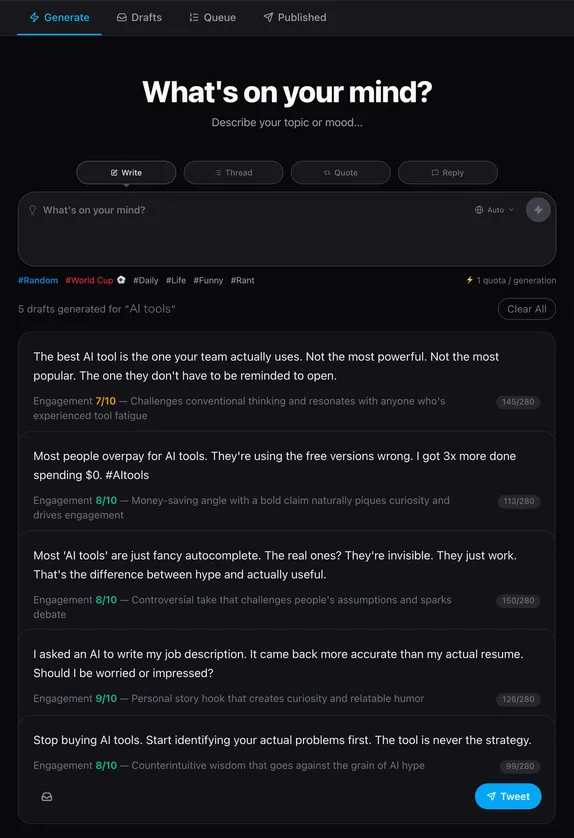
Topic: "AI tools" · Write mode · 5 scored angles
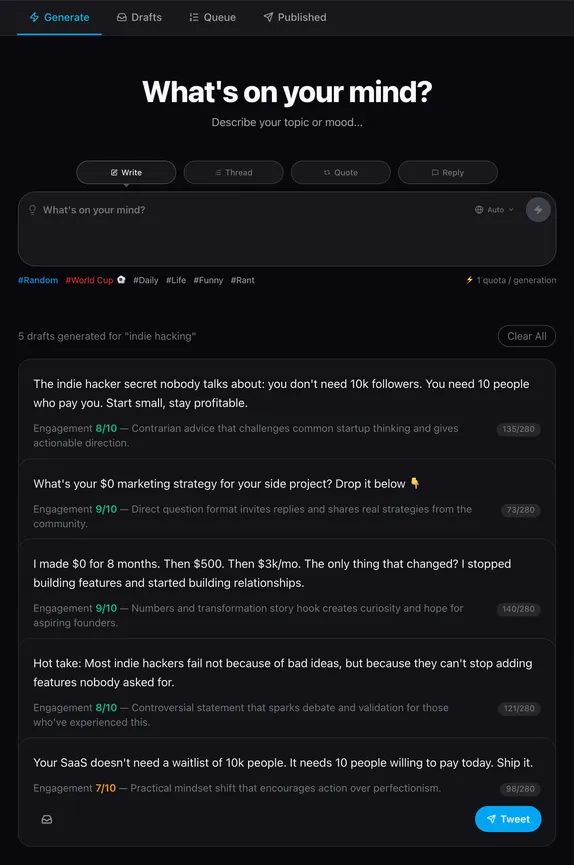
Topic: "indie hacking" · same workflow, different theme
Both captured from the live product flow: same workflow, different topics and angles, to show how output shifts with the subject you start from.
Same topic, different mode
The product is easier to trust when you can see that each mode is doing a different job. These are illustrative examples of the kind of draft shape TwitFlow aims to produce before you touch the tool yourself.
Write
Most people think consistency means posting every day. I think consistency means not disappearing for 2 weeks because you burned out trying to post every day.
Thread
Hook: I thought posting more would solve my growth problem. Body: It mostly exposed how weak my angles were. Closer: Better inputs beat more volume.
Quote
Strong point, but I think most creators copy the surface tactic and miss the system underneath. The workflow matters more than the single post.
Reply
This is the part people skip: the draft is not the finish line. The real advantage is getting to a sharper first version faster.
How people use it
We are not claiming public engagement numbers here. These are anonymized usage patterns we repeatedly design around: draft batching, conversation-first posting, and using the calculator as a follow-up benchmark rather than a vanity number.
Anonymous founder case
One common pattern is a founder using Write mode for launch notes, then saving 2 or 3 stronger angles to the draft bank for later in the week instead of forcing a post from scratch each day.
Reply-first workflow
Another pattern is using Reply and Quote mode when the easiest growth move is joining an existing conversation with a clearer point, not publishing another generic standalone tweet.
Calculator users
Some people come for the generator first and later use the account value calculator as a monthly check on whether stronger posting quality is improving the audience they are building.
Secondary tool
The calculator is there for people who want to connect better posting quality with audience value over time. It works best after you already have a publishing rhythm, not before.
Open the calculatorHow it Works
1) Angle-first output
A single topic can become a contrarian take, a personal lesson, a compact list, or a sharper question. The point is not to finish the thought for you, but to give you better options to choose from.
2) Focused workflow
Most social tools add scheduling, analytics, and setup friction before you can even test an idea. TwitFlow stays narrower on purpose: enter a topic, compare a few strong angles, save the best draft, and move on.
3) Practical usage
It works best when you already have a rough idea but need a cleaner shape for it: launch notes, founder lessons, reply angles, thread hooks, or a queue of posts you want to publish later.
FAQ
The homepage should answer practical questions quickly, then point people to deeper guides if they need frameworks, examples, or templates first.
Who is TwitFlow for?
TwitFlow is for founders, indie hackers, creators, marketers, and operators who want to post on X more consistently without adopting a heavy workflow tool. It is especially useful when you have ideas but need help shaping them into clear, post-ready tweets.
What do the four modes actually do?
Write mode creates standalone tweet options. Thread mode expands one idea into a sequence. Quote mode helps you respond to an existing post with your own angle. Reply mode generates replies that add signal instead of repeating what is already obvious.
Why are drafts stored locally?
Local storage keeps the workflow lightweight. You do not need a login just to save an idea, and you can build a private bank of drafts, queued posts, and posted ideas directly in the browser you already use.
What if I do not even know what to tweet about yet?
Start with one of the supporting guide pages first. The idea pages, topic database, hook pages, and templates are there to give the generator stronger raw material and make the output more useful.
Free tool
If you are posting consistently and building an audience, your account already has measurable value. This calculator uses follower count and engagement inputs to estimate earnings per post, monthly potential, and a rough account value range.
Input
Followers, tweets, likes, and retweets from your profile and analytics.
Output
Estimated value range, engagement rate, and earnings per post.
Use case
Useful for creator pricing, sponsorship positioning, and growth tracking.
Why people use it
Related guides
If you are still stuck at the idea stage, these pages give you frameworks, topic lists, and templates so the generator has better inputs to work with.